Tuesday, December 8, 2015

Progress Requires Idealism

Schools and parents should encourage young people to be idealistic about their goals.
http://www.adwerks.com/blog/wp-content
/uploads/2012/02/Idealis-Realism.jpg
"An idealistic vision is what motivates all of us. We want to know that we are working toward something consequential, something noble. This simple truth applies to every single person within your organization, from the receptionists to the general managers. That is the real job of a true leader — to offer a vision that inspires and motivates."
-Douglas R. Conant, The Power of Idealistic-Realism: Great Leaders Inspire and Transform 
There are few if any children who actually know what they want to grow up to be. I, for example, wanted to be a family doctor to care for my elderly parents until I grew a fear of blood and dissection. Furthermore, my intended major out of high school was accounting. Surprising, I eventually chose computer science, an area of study that is far from my childish dreams and even further from my realistic standpoint. Out of high school, I believe that it was important to be realistic about career goals because that puts bread on the table. However, I have since realized that is important to dream bigger. To truly enjoy life and succeed, we must have idealistic goals that motivate us. These goals will ensure that we are happy in life doing what we love and still succeeding in life.

Honestly, I was an incapable programmer during my high school years. I failed every AP Computer Science exam, but the final project inspired me. It made me feel like programming could progress the world further than any human could have imagined. Although I was a terrible programmer, I wanted to change the world by challenging myself. At the time I switched my major, I thought I was being incredibly idealistic. It was not about the money but rather about ability. I kept wondering if I really had the ability to pursue a career that required such mental capability. What if I failed? Was it too unrealistic to pursue a career I knew my capabilities were lacking for?

http://thebullbustercafe.com/wp-content/uploads/2013/05/dream2.jpg
When I entered college, my programming capabilities grew exceptionally. I was on top of my class and it all suddenly made sense to me. "Classes", "objects", and "instances" are all terms that I tried desperately to understand in high school. However, suddenly, they all made sense. It felt great knowing I could be idealistic in life and actually succeed at it. I continue to hone my goals and aspire for even more demanding and idealistic ones. As Coach Scott said in his article, Idealist vs. Realist, "dreams are meant to be followed." The bigger we dream, the more we will succeed and aspire for even greater success.
http://assets.motherjones.com/interactives/projects/features/code/img/banner.png
I thought I would never succeed in this major, but I have proven myself to my employees, my professors, and my colleagues that I am capable at what I do and at what I want to do. If possible, I would like to expand accessible technology for the visually impaired. Although it is such a small focus, it is definitely needed because every one in this world deserves to benefit from technology. 

http://blogs.edweek.org/teachers/coach_gs_teaching_tips
/Idealism%20and%20Realism.jpg
I aspire to be a user interface and user experience designer because to me it is an art. I never thought I would aspire to be anything related art because of my poor drawing skills. However, user interface and user experience truly requires a creative, innovative, and detail-oriented mind.I may not be able to program complex algorithms in assembly code, but I can design a webpage much better than anyone with my level of experience. 

I honestly believe that to succeed in life, you must be able to idealistic rather than realistic. There is no motivation without goals and no goals without dreams. Therefore, never forget to dream even when you feel your success is enough. It is important to teach young child and adults the significance of dreams. Those who aspire will achieve. Even if they never achieve their entire goal, they will be on their way there. That is much more successful than never having started. 

References:
Asai, S. (n.d.). Growing Forward. Retrieved December 8, 2015, from http://corporatelifecoach.blogspot.com/2012/01/idealist-vs-realist.html

Conant, D. (2012, January 12). The Power of Idealistic-Realism: How Great Leaders Inspire and Transform. Retrieved December 8, 2015, from https://hbr.org/2012/01/the-power-of-idealistic-realis

Saturday, November 21, 2015

Necessity of high quality video training

Source: http://www.success.com/sites/default/files/styles/article_main/public/main/articles/Maybe%20Its%20Not%20ADHD_0.jpg?itok=Lfx-toWZ

Project Recap

Sprint Four of the MSCS Workflow Project was a struggle. At the end of Sprint Three, we anticipated the arrival of the OnBase sandbox. However, we have since lost communication with the SJSU IT Team. Therefore, we revisited OnBase training videos to educate ourselves further on the interface of the OnBase Unity and Web clients. Like the first time, we found the videos inadequate. The videos are long, wordy, and low quality. Furthermore, they were designed without target audiences in mind. Our objective is to create a user friendly implementation of OnBase. Without proper training, our intended audience would not use our product. For example, only the minority of SJSU staff and students use the Adobe Creative Cloud because they have not been properly trained to use the software.

What videos should be like...

I particularly like Jeremy Vest's description of "video" in his Six Steps to Creating High Quality Video Training:
Video is the fastest means currently available to create engaging online learning experiences, especially for the masses. Using video is an easy way to make a connection between the instructor and the learners.
Videos are meant to be quick learning tools, but I find the OnBase training videos difficult to concentrate on and distracting. The poor video quality and the unnecessary zooming in and out make it difficult to learn much about OnBase's interface. From the reviews, OnBase sounds like an excellent product; however, the development team really needs to up their game when it comes to producing quality training videos.

Tips

I find that we must create proper training videos before releasing the OnBase implementation to the SJSU MSCS Department. Therefore, I have found some guidelines for creating quality videos from Jeremy Vest's Six Steps to Creating High Quality Video Training and Mike Conaty's 5 Tips to Make Your Training Videos Less Mind-Numbing

1. Planning the video
I think it is very important to have a good story board and script before filming. We should set our learning goals and create a course outline. These are two important aspects of a real classroom.

2. Cut the lessons into smaller pieces
One thing I find most grueling about OnBase's videos is their length. These instruction videos should be quick and to the point.

Source: http://www.whiterosereader.org/wp-content/uploads/2015/03/video-editing-software-guide.jpg

3. Edit ruthlessly
The OnBase videos did not seem like they were edited at all. They were raw footage. The design was lacking. There was no coordination. The zooming in and out was disruptive.

Conslusion

These are only a few tips to proper training videos. However, I feel like this is an important topic for the scrum team and the project owner to study before attempting to make instructional videos or any kind of training modules.

References:
5 Tips to Make Your Training Videos Less Mind-Numbing. (n.d.). Retrieved November 24, 2015, from http://www.brunswickmedia.com/2011/04/5-tips-to-make-your-training-videos-less-mind-numbing/

Six Steps to Creating High Quality Video Training by Jeremy Vest : Learning Solutions Magazine. (n.d.). Retrieved November 24, 2015, from http://www.learningsolutionsmag.com/articles/185/six-steps-to-creating-high-quality-video-training

Monday, November 2, 2015

Team velocity versus team capacity

Team velocity and team capacity are significant concepts in agile development. They allow clients and management to understand the team's working ethic. My team was struggling with these concepts when completing our burn-up and burn-down charts; however, after some research and lecture, we have grasped these concepts. It is important for the client to understand team velocity and capacity because they summarize a team's work ethic--are they able to complete their tasks in a speedy and orderly manner?

What is team velocity?
Driving Velocity
As described by Catia Oliveira in Velocity on Scrum Alliance, "velocity is velocity. And velocity is measured . . . as velocity is." I particularly like the way Oliveira explains velocity because it is simple and relatable. She relates a project's velocity to driving.
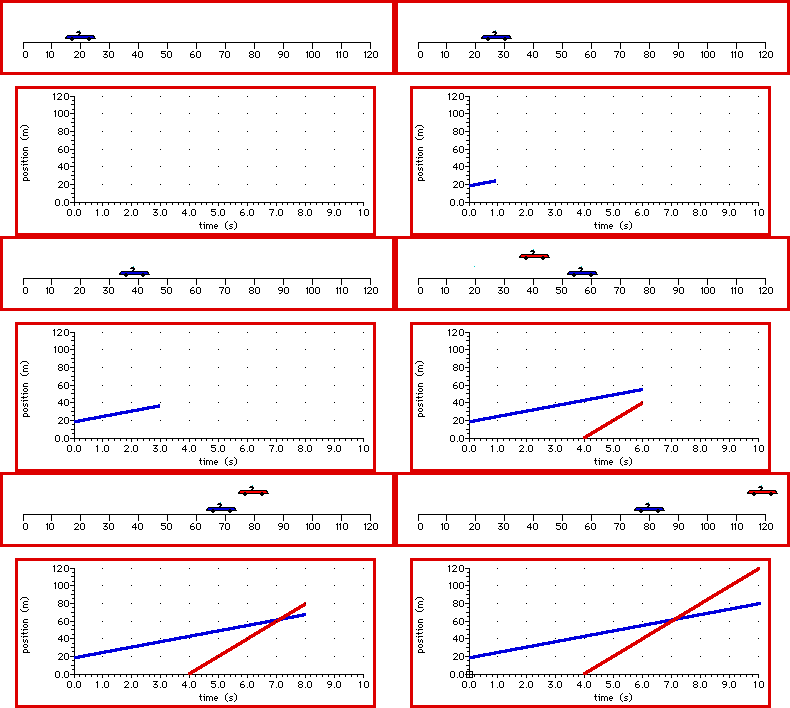
How do you measure your velocity while driving? (Imagine the speedometer is broken.) You've been driving for the last two hours, you've gone 160 kilometers, so you know your average velocity is 80 km per hour.  
http://www.physicsclassroom.com/mmedia/kinema/fs.gif

Team Velocity
A project's velocity is measured in a similar way. "Velocity is the number of story points completed by a team in an iteration." To obtain an average velocity, simply add velocity from every iteration (distance) and divide by the number of iterations (time). 
https://www.scrumalliance.org/scrum/files/e3/e3a2ff2a-27a2-444c-81af-c2e8dbfb3128.jpg

Importance of Team Velocity
Team velocity is important because it allows the team to predict how much scope can be deliver by a specified due date. It allows the team to understand its limits while defining an amount of scope that can be committed within a sprint.

Can we compare velocity of different teams?
Product owners may want to compare the velocity of different teams to see which teams are more effective. However, comparing velocity will not help in comparing teams because they are using different units for their story points. Story points are relative to the team. One team can assign 20 points as an hour of work while another team can assign 60 points to the same amount of work.

One effective way to compare work ethic of two different teams is to compare their velocities to their team capacities.

What is team capacity?
According to Avienaash Shiralige, "team capacity is calculated as per people availability in that sprint." It must be determined before planning the sprint, so scope of deliveries can be estimated.
Let’s take an example.
Say team is of 5 people, then total capacity assuming 8 hour day, 2 weeks sprint(10 days) is = 5*8*10 = 400 hours. Planning for this total capacity will be disaster. It will lead to team working over time, rushing towards the end, quality cuts and low team morale.
In reality, management never plans for 100% capacity. They use a focus factor to determine real capacity. The factor usually lies in the range of 0.6 to 0.8. Therefore, a five person team working full-time would really only have a capacity ranging from 240 (400 * 0.6) to 320 (400 * 0.8) hours.

Why isn't capacity at 100 percent?
There are many factors in agile development that affect team capacity.

  1. Team vacation
  2. Scrum meetings
  3. Defects
  4. Training/Education
  5. Administrative duties
  6. Less mature team
  7. New to agile
  8. Complex product or new technology
Conclusion: Team velocity versus team capacity
To truly understand a team's work ethic we must compare its velocity to its capacity. Management must understand the time estimations behind story points and compare the time spent on tasks with team capacity to see if the team is utilizing its resources effectively.

https://i-msdn.sec.s-msft.com/dynimg/IC372417.png

References:

Oliveira, C. (2014, February 6). Velocity. Retrieved November 3, 2015, from https://www.scrumalliance.org/community/articles/2014/february/velocity

Shiralige, A. (n.d.). How To Do Effective Capacity Planning on The Scrum Team. Retrieved November 3, 2015, from http://www.agilebuddha.com/agile/how-to-do-effective-capacity-planning-on-the-scrum-team/

Thursday, October 15, 2015

Pros and Cons of OnBase Unity Client Versus Web Client

Before personalizing OnBase's software for San Jose State, it is important to understand the two main clients that OnBase offers: web and Unity. They both allow the same powerful searching, editing, and managing tools; however, they do have their pros and cons. We, the project owner and the team members, need to understand their capabilities and their use cases for the MSCS department office before we can customize the software.

Web Client

The web client is the first we need to discuss because it is the most practical. It can be used cross-browser and cross-platform. Since it is easily accessible, faculty and students will actually use it. Nowadays, no one wants to go through the hassle of downloading and installing more programs than necessary on their devices. More and more technology is going web-based because it is fast and accessible.


Although the accessibility is great, OnBase definitely did not please with the user interface of its web client. The web page examples in OnBase's training videos were outdated looking. They looked like web pages from a decade ago. This outdated user interface may hinder the training process for students and faculty. Hopefully OnBase has updated its web client's design since it filmed these training videos.

Summary

Pros:
  1. Students and faculty can easily access the website. 
  2. It is easy to deploy. 
  3. It allows customizable portal views of content. 
  4. It can extend documents and e-forms to those without OnBase accounts. 
Cons:
  1. Web clients require internet access. 
  2. It is not aesthetically appealing. 

Unity Client

The desktop version of OnBase is the Unity client. As its name suggests, it offers unity between OnBase's data management software and Microsoft Office products' look and feel. This is definitely my favorite of the two clients because it is beautifully designed--thanks to Microsoft I would like to add.


This combination of software will provide great assistance to school administrators. Administrators not only manage their data, but they also need to be able to edit when necessary. The familiar look-and-feel of Microsoft Office products will definitely make training a breeze since administrators probably already use these tools when creating their forms. When students make small mistakes, administrators can quickly notify the students through email and make the small changes themselves without downloading the documents.

Summary
Pros:
  1. The Unity client definitely beats the web client in design with the sleek, familiar and friendly interface. 
  2. There are many training documents available online for the Unity client from other universities. E.g. http://www.indiana.edu/~onbase/UnityManual.pdf
  3. OnBase supports ClickOnce technology for easy installation.
  4. Users can easily customize the desktop client and enhance their experience. 
Cons:
  1. The desktop client requires installation.
  2. It does not allow access to users without OnBase accounts.


Conclusion

Honestly, I think it is a good idea for us to customize both the web client and the Unity client. They can be used in different situations. The administrators would definitely appreciate having Unity because it is slicker and familiar. The students and faculty will appreciate the web-based client because they only need it for viewing and submission purposes.

One problem with this university is its large scale purchases of software and technology that its faculty do not use.
"Pushed by its ambitious president, San Jose State is spending $28 million on high-tech communications systems worthy of a campus of the future -- but an investigation by this newspaper shows the project was crafted largely in secret, purchased without competitive bids and adorned with pricey gadgets that many professors may not even use."
Katy Murphy
This is extracted from an article that was written after the school sealed the deal on a $28 million dollar contract for phones with cameras that the faculty do not even use. Most of the faculty cover their cameras up or do not even know how to use the technology. Events like these make me wonder if our purchase of OnBase is worth it. Therefore, we really need to understand the workflow of the MSCS office and implement a system that will be efficient and regularly used.


References
https://www.onbase.com/en/product/onbase/access/client-interfaces#.Vh81sPlVhBc
http://www.mercurynews.com/education/ci_26666181/san-jose-states-costly-high-tech-upgrade-cisco

Images
https://wiki.carleton.edu/download/attachments/23891680/OnBaseUnity.PNG?version=1&modificationDate=1421102822000&api=v2
https://www.ohio.edu/docimage/Training/ThinClient/courses/WS-0020/course_elements/OnBase/content/webclient_desktop.jpg

Monday, September 28, 2015

Accelerate Academics Forms Processing with OnBase Enterprise Content Management Software

Higher education faces record numbers of enrollments

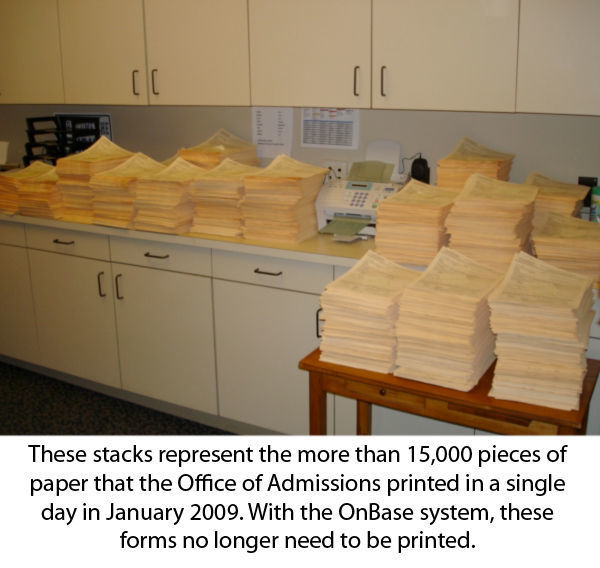
With more students comes more data management demand. Yet, most colleges and universities still proceed with pen and paper. Resources are poured into completing the manual processes of form approvals and notifications rather than finding technological enhancements for the workflow in an academic enrollment or advising office.


Hyland offers a solution: OnBase

Hyland offers its Enterprise Content Management software, OnBase, as a solution to higher education data management demands. It claims to "eliminate the manual, paper-based processes that bog down staff" and "speeds turnaround times while providing a view into how well the applicant pool is aligning with [the university's] target populations.

Quick Look: Features

OnBase has many functionalities, but its main ones are worthy of purchase. Users can quickly sort their files into the digital database and search for documents based on keywords. Documents can be scanned in and image processing allows users to search for keywords. This makes the transfer process from paper to digital much easier because the admissions office can speed scan their documents into the database and have the software sort the documents with little to no user interaction once the software is implemented based on user stories.


Security

Hyland boasts about its "secure data centers, encrypted in-transit connections, built-in redundancy and data replication," but we all know that nothing is 100% secure on the site. Nevertheless, something worthy to note is that they will tailor to their client's security and compliance needs.

Usability in Advising Context

OnBase has a very interesting functionality where it will match advisors with their advisees. They will route student files to the appropriate advisor in advance of an intial advising session. Since OnBase seems to have notification system, we could enhance this feature to send notifications to the approvers on a daily, weekly, or bi-monthly basis.

A final word of opinion

I think this product has great potential. I have only seen a very short demo on the product's user interface, but it seems like a great product if the client learns how to use it. It would be better if this could be web-based. From what I can see, it seems the program must be downloaded. Not all faculty are keen on installing software especially the non-tech savvy ones.

I think Hyland is doing a great job with customer service. From the reviews, the company is willing to work around software design for its clients. Perhaps there will be a way for us to embed these documents in a web application for our project.

Bibliography

Fingertip access to current student information improves advising, student satisfaction. (n.d.). Retrieved September 29, 2015, from https://www.onbase.com/en/solutions/higher-education/enrollment-management/student-advising#.VgojDstVhBc

Solutions for Higher Education Enrollment Management. (n.d.). Retrieved September 29, 2015, from https://www.onbase.com/en/solutions/higher-education/enrollment-management